
On this page
Evaluate a SaaS source-code purchase by matching each important claim to evidence: a demonstrated workflow, a documented requirement, a license term, or a reproducible check. Start with what your customers need to do. Then check the delivery and the work you will inherit.
You may not have the private repository before buying. A useful review therefore has two parts: pre-purchase due diligence using public material and seller answers, followed by technical acceptance when you receive authorized access. Do not mark a code-level question as verified just because a demo looks convincing.
Write the purchase requirement first
Describe one complete customer journey and the roles involved. For a hypothetical service business, this could be: an owner creates an organization, invites a colleague, receives a customer request, assigns it, and closes it with a record of the outcome.
Add the conditions that could change your decision. Perhaps one organization must never see another's requests. Perhaps records must be exportable. Perhaps an external service must work in your country. These are examples, not claims about a particular SaaSCode product.
Label each requirement as essential, useful, or optional. An essential gap needs a resolution before you commit to launch. An optional gap belongs in your comparison without silently becoming a requirement that every product must meet.
Use a claim-to-evidence worksheet
Keep the record compact enough to use while browsing. The goal is to distinguish what you saw from what you inferred.
| Question | Evidence to request or inspect | Decision note |
|---|---|---|
| Does it solve the main job? | Demo journey and product documentation | Observed steps, missing steps, role used |
| What is delivered? | Delivery description and file/document inventory | Source, setup material, exclusions |
| Can we operate it as intended? | Product license and applicable terms | Permitted use, limits, unresolved wording |
| What services are required? | Installation and integration documentation | Account owner, availability, cost unit |
| Can our team maintain it? | Stack, release notes, update process, support scope | Responsible person and expected work |
| What protects customer data? | Documented architecture and authorized technical evidence | What is established and what remains untested |
| Can we recover or leave? | Export instructions, backup scope, restore procedure | Data formats and recovery owner |
Use three evidence states: verified for this scope, confirmed gap, and unknown. An unknown is a question you still need to answer. It is neither a defect nor proof that everything is fine.
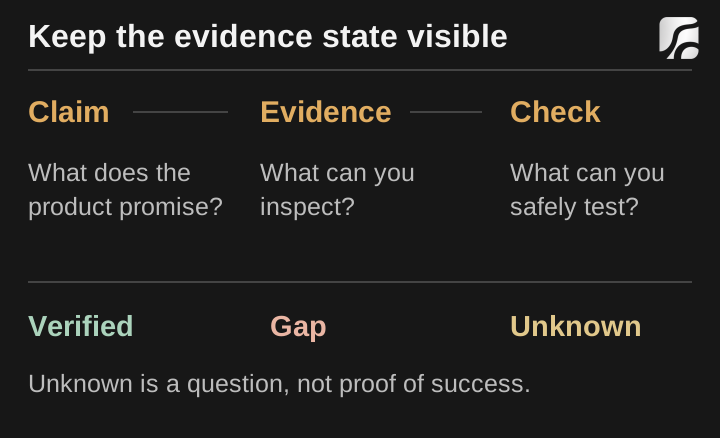
Editorial diagram: the decision should follow the evidence, with unknowns kept visible.
1. Try the main workflow in the demo
Use the seller's intended demo access and follow the normal interface. Check whether labels, navigation, and available actions let you complete your scenario. Note the account role: a demo of an administrator's view says little about a customer's permissions.
Follow the workflow beyond the first successful action. Can you find the record again? Does an edited status appear where it should? What happens when a required field is missing? Is the result understandable on a phone? Only perform actions the demo is intended to allow.
A demo can use sample data and disabled integrations. That is not automatically a flaw. Record the boundary and ask how the corresponding behavior works in a buyer's installation. A simulated payment button, for instance, cannot establish that your provider account has been approved or configured.
For SaaSCode, start from a product page, use its linked demo, and read the relevant product record. Product-specific evidence is more valuable than assuming every application exposes every capability described elsewhere on the site.
2. Check the source delivery and installation path
Before purchase, establish the supported stack, required services, setup documentation, and access method. Ask whether the demonstrated version matches the offered release. If a feature is important, identify the documentation or release that includes it.
Once you have authorized access to the delivery, ask the person responsible for implementation to reproduce its documented installation in an isolated environment. They should record the release, commands used, required services, and result. Do not use production customer data as test data.
A dependency list helps identify what the application uses, but it does not establish that installation succeeds. Conversely, one installation failure can come from an unsupported environment or missing configuration. Keep the failing step and error available so the cause can be resolved.
Ask for a dependency inventory tied to the delivered version. For repositories hosted on GitHub, its SBOM export can list dependencies and associated version and license information. Use that inventory to identify components needing review. Possessing an SBOM does not establish that the application is vulnerability-free or that every intended use complies with every dependency license.
3. Read the license against your business model
Write down who will operate the application and who needs access to its source. Compare that intended use with the license rather than relying on words such as ownership or white-label in isolation.
SaaSCode's terms allow operation and modification under the applicable product license and restrict distribution of the source itself. The license selected for the product matters for client deployments. Plus membership is separate; it does not grant client rights.
Read delivery, updates, support, and refund conditions before downloading as well. Those terms affect your purchasing process. If your requirement is not clearly covered, use support to resolve it before relying on an interpretation. This checklist helps collect the questions; it does not replace the agreement.

A backup is useful when recovery is possible — an editorial oil illustration.
4. Look for evidence behind access-control claims
A hidden button does not prove that an action is protected. OWASP's authorization guidance calls for permission checks on every request and for the particular object or action being accessed.
Before purchase, ask what evidence is available for the permissions important to you. After purchase, an authorized review in your own isolated installation can check those rules using test accounts and synthetic records. Keep ordinary member behavior, administrative behavior, and organization boundaries distinct.
For example, a reviewer might create two test organizations and verify that a member of one cannot read a private record belonging to the other. A denied request establishes something about that path and setup; it does not certify the entire application as secure. Do not probe a seller's public service or other users' records without permission.
If you cannot inspect or test a required control, keep it unknown and decide what evidence you need from the seller or a qualified reviewer. A framework name, a badge, or a passing build is not a substitute for that evidence.
5. Price the operating dependencies
List every service needed for your intended workflow. Record whether it is mandatory or optional, who will own the account, its usage unit, and any eligibility or plan requirement. Include storage and email as well as the application's headline integration.
An implemented provider connection does not include unlimited provider usage. It also does not show how much your particular users will consume. Model the expected actions and their costs using the launch cost worksheet, then replace assumptions with measured usage after a controlled pilot.
Where a feature depends on AI output, evaluate examples representative of your task and budget for rejected or repeated results. Do not treat one successful demo response as a quality guarantee for every input.
6. Make maintenance and recovery part of acceptance
Identify who will review release notes, apply updates, handle your modifications, and respond when a provider changes. Read support scope carefully: answering a question about shipped behavior is different from maintaining your custom deployment.
Ask what data can be exported and what the backup covers. Supabase's backup documentation, for example, explains that database backups do not include Storage API objects. If the application uses both, include both in a recovery exercise.
A useful acceptance record says what was restored, into which isolated environment, and what worked afterwards. A backup job's successful status alone does not establish that the whole service can be recovered.

Follow one workflow across roles — an editorial oil illustration.
Turn the review into a decision
For each essential requirement, record the evidence, remaining work, owner, and unresolved assumption. Then choose a next action: proceed, ask for specific evidence, obtain an implementation estimate, or choose another starting point.
Avoid an invented total score. A product can meet many small preferences and still miss the one workflow your business depends on. Equally, an unfamiliar feature that you do not need should not disqualify an otherwise suitable application.
Pick one candidate from the SaaSCode catalog and complete the worksheet. If the missing work reaches into the core product, compare a finished application, boilerplate, and custom build before deciding. The output of the review should be a purchase you can explain and an implementation plan somebody can own.
Evaluate the changes you expect to make
A useful developer review includes the likely customization boundary. Trace the files, entities and permissions involved in one small change. Our AI-assisted customization workflow shows how to define acceptance before editing, while the prototype-to-operation guide helps identify work that a convincing screen may still leave open.
Editorial collaborations
Something useful to add?
Bring a documented case, an expert perspective or a better source to the SaaSCode blog.
Editorial collaborations