On this page
A failed SaaS renewal needs three coordinated responses: a collection decision, a useful message to the customer, and an application-access decision. Retrying the payment handles only the first. Your customer also needs to know what they can do now, what changes next, and how to recover without losing their work.
For an existing paying customer, decide that policy before the failure occurs. A short grace period may suit a scheduling service whose users need to finish today's work. A costly generation feature may need tighter limits. Neither choice should emerge accidentally from whichever webhook reached your application last.
This guide follows a fictional scheduling SaaS through a failed renewal. Its grace period, restrictions and messages are proposed operating choices, not SaaSCode defaults or payment-provider requirements. We use Stripe's documentation as one concrete provider reference; the same questions need answers for whichever billing system your chosen product actually uses.
Start with a renewal, not every kind of payment problem
Our customer already has a paid workspace containing appointments. Its next subscription payment fails. That differs from an initial payment that never activated an account, an agreed cancellation, a disputed charge, or an invoice someone is still reviewing before its due date. Keep those cases separate so a recovery rule does not accidentally grant access to a new unpaid account or restart a canceled service.
Identify the workspace, subscription, relevant invoice and covered service period. Then ask whether the customer needs to take action, whether another collection attempt is expected, and which access policy applies. A support agent should be able to answer those questions without reading raw payment logs.
The decision also belongs in your operating budget. Continuing service during recovery still consumes hosting, messages, storage or API usage. Choose a grace policy you can afford and explain, rather than treating temporary access as either free or automatically unacceptable.
Make the collection system and your application agree
In Stripe's payment retry documentation, retries depend on configuration and the type of failure. A hard decline can require a new payment method before another charge can execute. A scheduled attempt is therefore not a promise of another successful charge.
The same documentation distinguishes a subscription's default payment method from the customer's default. Updating the customer-level method alone may leave an existing subscription retrying its own default. Test the actual update path your customer uses. A message saying “we have your new card” is insufficient if collection still points elsewhere.
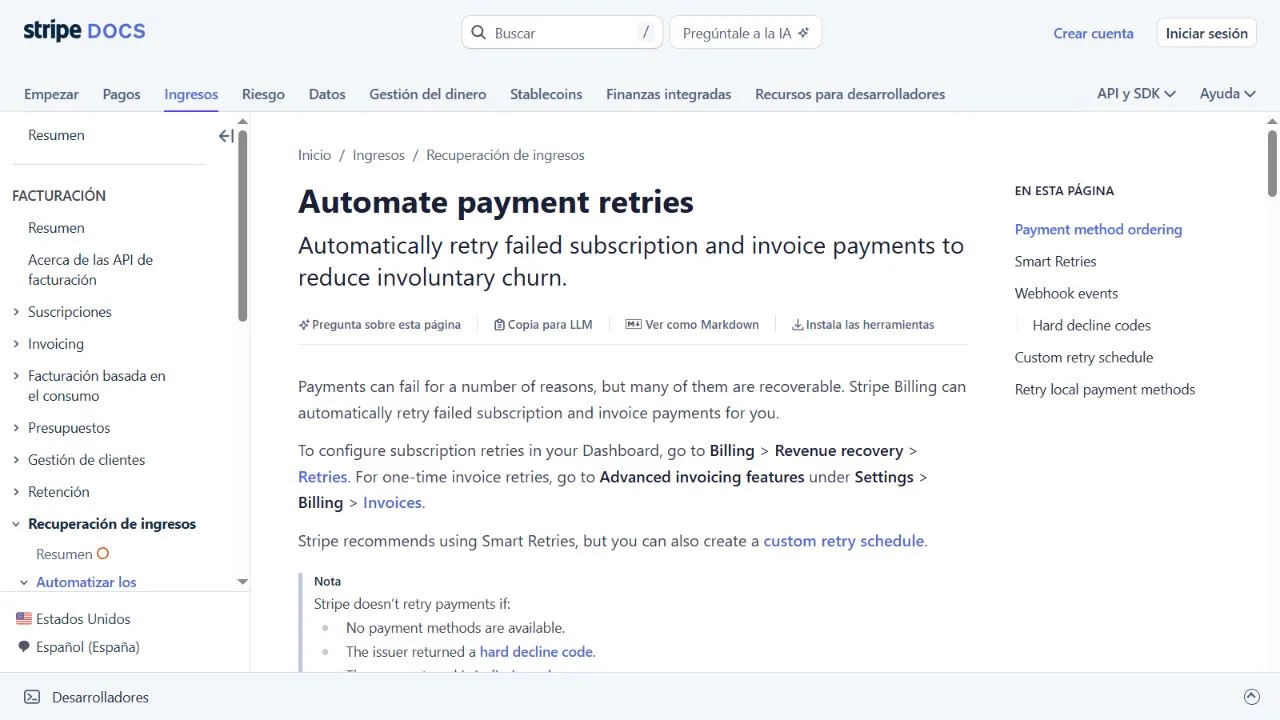
Source: Stripe Docs — Automate payment retries, captured October 4, 2026. Original documentation, with Spanish navigation and English article text; not a SaaSCode interface or a configured customer account.
For Stripe integrations using Automations, the documented next-attempt value arrives through invoice.updated, rather than the failure event. Use the provider's current source of retry information before displaying a next-attempt time. If you cannot establish one, say what the customer can do instead of inventing a countdown.
Choose one owner for collection retries. If the provider owns them, your application should not also start an independent charging loop whenever a worker or customer refreshes the page. A webhook-delivery retry and a payment-collection retry are different operations. Confusing them can turn an attempt to repair notification delivery into an unintended payment action.
Describe access as specific actions
“Keep access” and “block the account” are too broad for our scheduling example. The useful questions are whether staff can see existing appointments, change them, accept new bookings, run automated reminders and reach billing support.
Here is our proposed policy for an existing customer's failed renewal. It assumes the product can enforce each boundary; inspect the implementation before offering it.
| Capability | During the stated grace period | If unpaid when grace ends |
|---|---|---|
| View existing appointments | Available | Available in read-only mode |
| Create or change appointments | Available | Restricted |
| Accept new public bookings | Available | Paused with a clear customer-facing explanation |
| Send scheduled reminders | Continue under the stated policy | Pause future sends; flag affected appointments for the operator |
| Open billing and contact support | Available to the appropriate account role | Still available |
| Existing records | Retained under the service's policy | Not deleted as a side effect of this billing transition |
Read-only access is useful here because a coordinator still needs to see tomorrow's appointments. It is not costless, and it is not the correct policy for every service. An AI feature with significant per-run cost could restrict new generations earlier while preserving access to completed outputs. Define that variation explicitly instead of quietly applying a different rule on each screen.
The restriction must also cover APIs, background workers and public booking pages. Disabling a button does not stop a queued reminder or a direct API request. Likewise, an account lock that hides the payment-update route traps the very person who can resolve the problem.
This is an application-access policy. Decide separately whether collection and future invoicing continue, pause or end at that point, using the provider's supported configuration and the offer made to the customer. Restricting the app must not silently mean “billing canceled,” or leave someone paying for a service you have stopped without explanation.
Walk through one recovery timeline
Suppose our fictional renewal fails at 09:00 UTC on October 4. The operator has chosen a fixed 72-hour grace period, ending at 09:00 UTC on October 7. This duration is an example, not a recommendation or a Stripe setting. The customer sees the deadline with an explicit time zone.
At the first failure, the workspace enters grace. The account's billing contact receives one clear notice and staff see an appropriate in-app status. A later retry failure does not restart the 72-hour clock. Otherwise, repeated events could extend the allowance indefinitely while the customer receives contradictory deadlines.
If payment is confirmed and the relevant subscription is eligible before the deadline, normal access continues and pending failure reminders are suppressed. If the invoice is still unpaid at the deadline, the application applies the restrictions it announced. A card update by itself does not settle the invoice or prove that normal access should resume.
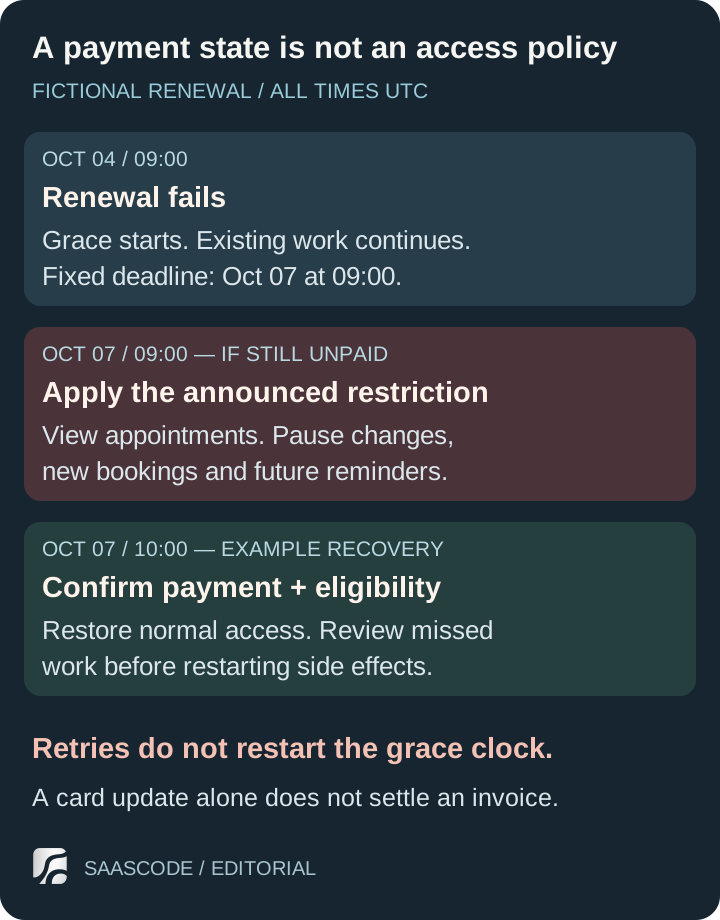
Proposed policy for one fictional scheduling service. The grace deadline stays fixed through retries. Restoring access requires checking the relevant payment and current subscription, not just receiving a browser success redirect.
Stripe's subscription webhook guidance pairs invoice.paid with checking that the subscription is active before extending access. That distinction matters when other invoices or subscription changes affect eligibility. A payment for an old invoice should not, by itself, reactivate an intentionally canceled workspace.
In our scenario, payment and current eligibility are confirmed at 10:00 UTC on October 7. The application restores normal access once it has reconciled those facts. It also explains what happened during the restricted hour: new bookings were paused and reminders were not sent. Do not automatically replay every missed message. Review whether it is still useful before sending a late appointment reminder.
Tell the customer the next useful action
A recovery message should identify the service and affected workspace, describe the present consequence and provide a safe route to resolve it. Send billing details to the authorized billing contact; ordinary staff may only need to know that an administrator is handling an account issue.
For our example, an initial message could say:
We couldn't collect the renewal payment for your scheduling workspace. Your team can continue working until October 7 at 09:00 UTC. Open Billing from your workspace to review the invoice and payment method. If payment remains unresolved at that time, existing appointments will stay viewable, while new bookings and changes will pause. Contact support if you need help.
That is proposed copy for the stated policy, not a message we sent. Its deadline must come from the same decision used by the application. If customer authentication is required, direct them to the relevant secure payment step instead of telling them to wait for another automatic retry. Never ask them to reply with card details.
After confirmed recovery, a shorter message can close the loop:
Your renewal is now settled and normal workspace access has been restored. New bookings and appointment changes are available again. Please review appointments affected while reminders were paused; we haven't resent those reminders automatically.
A provider may already send recovery emails. Review that configuration alongside your own messages so one customer does not receive overlapping demands with different deadlines. Before sending a queued reminder, recheck whether the payment is still unresolved. The recipient should not get “please pay” after support has already confirmed recovery.
Reconcile current facts when events arrive late
Stripe's webhook documentation explains that events can arrive out of order and may be delivered more than once. Treat a delivery as a reason to evaluate current billing facts, not as unconditional permission to move the workspace backward to the event's historical state. Verify the event's authenticity before using it.
For example, a delayed failure event may arrive after the renewal was paid. The useful result is still normal access when current payment and subscription checks support it. Record processed event identities, make repeated transitions safe, and reconcile the invoice/subscription relationship. A timestamp alone is not a complete duplicate or ordering strategy.
If the provider is unavailable when you need to check, make that uncertainty visible to the operator. Our proposed policy preserves the last established access decision temporarily and opens a review task; it does not interpret a network error as a successful payment. Define a bounded review deadline and owner so “temporarily” does not become an unmonitored permanent exception.
We exercised a small local policy model with synthetic snapshots. It checks access immediately before and at the grace deadline, a paid eligible renewal, a paid invoice on a canceled subscription, a late failure notification with current paid facts, an unpaid invoice after a card update, an unavailable snapshot, a later retry that leaves the deadline unchanged, and a mismatched workspace. The recorded outcomes matched the proposed rules.
This exercise tests decision logic in one local process. It does not charge a card, verify a webhook signature, call Stripe, send email, enforce real application permissions or demonstrate durable duplicate handling. A production implementation still needs those boundaries tested. The integration guide explains why repeats and ambiguous outcomes need more than an in-memory record.
Finish the loop in support and in the product
Give support a compact view of the relevant invoice, current subscription, last confirmed access decision, grace deadline, latest customer notice and next action. Keep unnecessary payment details out of general application logs. If an operator grants an exception, record its reason, owner and expiry; a silent database edit leaves the next automated decision with no explanation.
Measure recovery by the original failed renewal, not by the number of events processed. Distinguish a settled invoice, restored access, an unresolved case and a customer who intentionally canceled. Start with case review and actual timestamps before attributing improvement to a retry configuration. This article offers no recovery-rate benchmark or promised revenue uplift.
Before inviting your first paying customers, rehearse both the successful renewal and the uncomfortable path: failure, notice, deadline, restriction, payment update, confirmed recovery and support follow-up. Include the customer's view and the background work that continues when nobody is logged in.
A finished SaaS application from the SaaSCode catalogue gives you software to operate and adapt. Verify its documented billing provider, event handling and access controls before promising this behavior. A dependable paid service makes the recovery path understandable to the customer and executable by the business running it.
Editorial collaborations
Something useful to add?
Bring a documented case, an expert perspective or a better source to the SaaSCode blog.
Editorial collaborations