On this page
SaaS customer data migration is ready when the customer can continue their work in the new application and account for what moved, what changed and what stayed behind. An import reporting “success” is one piece of that decision. It does not establish that jobs belong to the right customers, that a repeated upload is safe, or that yesterday's changes made it across.
Plan the first import around a small customer workflow before promising a launch date. Agree on the records in scope, map their meaning, rehearse with exceptions, and let the customer check the result before switching everyday work to the new system.
Consider a fictional maintenance business moving its active customer jobs from a spreadsheet into a SaaS. Its staff need to find a customer, open an unfinished job and see what to do next. We will use that example throughout. It is a proposed onboarding scenario, not a claim that a particular SaaSCode product includes this importer.
Start with the work the customer needs on Monday
“Bring everything over” is difficult to price, test or accept. Separate what the team needs immediately from what it needs only for reference.
For our maintenance business, an initial scope could include active customers, open jobs, the person responsible and the notes required to finish those jobs. Older completed jobs might remain in an agreed archive for the pilot. Attachments, invoices and account access need explicit decisions; they do not become included because they sit beside the customer name in the old system.
Ask the customer to show one ordinary job and one troublesome one. Follow the relationship between the customer, site, job, assigned person and files. Decide which record is the source of each fact. Two spreadsheets with a column called “status” may describe different things: a customer relationship in one, the progress of a job in the other.
Write the acceptance sentence in customer language: “Our coordinator can find each in-scope open job, see its customer and next action, and continue without consulting the old sheet.” Then name any deliberate exceptions. That is a more useful launch condition than a raw row count.
If the application itself is not running under your accounts yet, follow the source-code launch sequence first. Installing software and bringing a customer's existing work into it are separate milestones.
Inspect the actual import path before offering the migration
Read the delivered product's documentation and inspect its current interface. Establish whether it supports this record type, creation, updates, relationships, attachments and an error report. A CSV export at the source says nothing about the destination's import capabilities.
If a documented importer is available, work within its contract. If an API is the appropriate route, inspect its authentication, limits and update behavior. If neither supports the required workflow, a custom migration may be needed. Source access makes that development possible; it does not make the migration already implemented.
For a concrete documentation example, HubSpot's import guidance describes identifiers for updating or avoiding duplicate records and for associating related records. Those are HubSpot's rules, not a portable promise about another application. The useful habit is to find the equivalent rules for your actual destination before preparing a customer's file.
Also establish what an import can trigger. Creating a customer or changing a job's status might start a welcome message, reminder, workflow or external integration. In rehearsal, use an isolated destination with synthetic records and controlled outgoing effects. Before the live transfer, agree which effects should happen and when. Loading historical data should not accidentally announce new work to customers.
Map meaning, identity and missing values
A field map should explain what the destination value means and what happens when the source cannot supply it. Here is part of our fictional mapping:
| Source field | Proposed destination | Rule for this example |
|---|---|---|
| Job reference | Source job ID | Preserve the original identifier; do not generate a new identity on each retry |
| Customer reference | Customer relationship | Resolve through a checked customer map; hold the job if no customer matches |
| Job state | Workflow status | Map Open to queued and Done to completed; review all other values |
| Description | Job title | Preserve useful wording and punctuation; require a non-empty value |
| Assigned person | Owner | Resolve an approved account; do not silently give all jobs to the importer |
| Due date | Target date or appointment | Establish whether it is a date-only promise or a time in a named zone |
For identity, our local example uses the combination of workspace, source system and source job ID. A job reference is not assumed unique across every customer account. A real implementation must establish the workspace through authorized execution context and enforce its identity rules durably; trusting a workspace value inside an uploaded file is insufficient.
Names and email addresses can be useful clues during review, but an operator should not merge two customer records simply because their names look similar. A shared email address may serve an entire office. A changed email address may still belong to the same customer. Preserve a trace from the source record to the destination record so someone can investigate later.
Decide what blank means separately for creation and update. A blank owner on a new job might require review; a blank owner on an update might mean “leave the existing owner alone.” It should not become an accidental instruction to erase the assignment. Record the chosen behavior and rehearse it against a populated destination.
Give every source row an outcome
We ran a small local, in-memory rehearsal using five synthetic job rows. It exercises selected mapping, repeat and exception rules. It does not parse a real customer CSV, call a product API or test a production database.
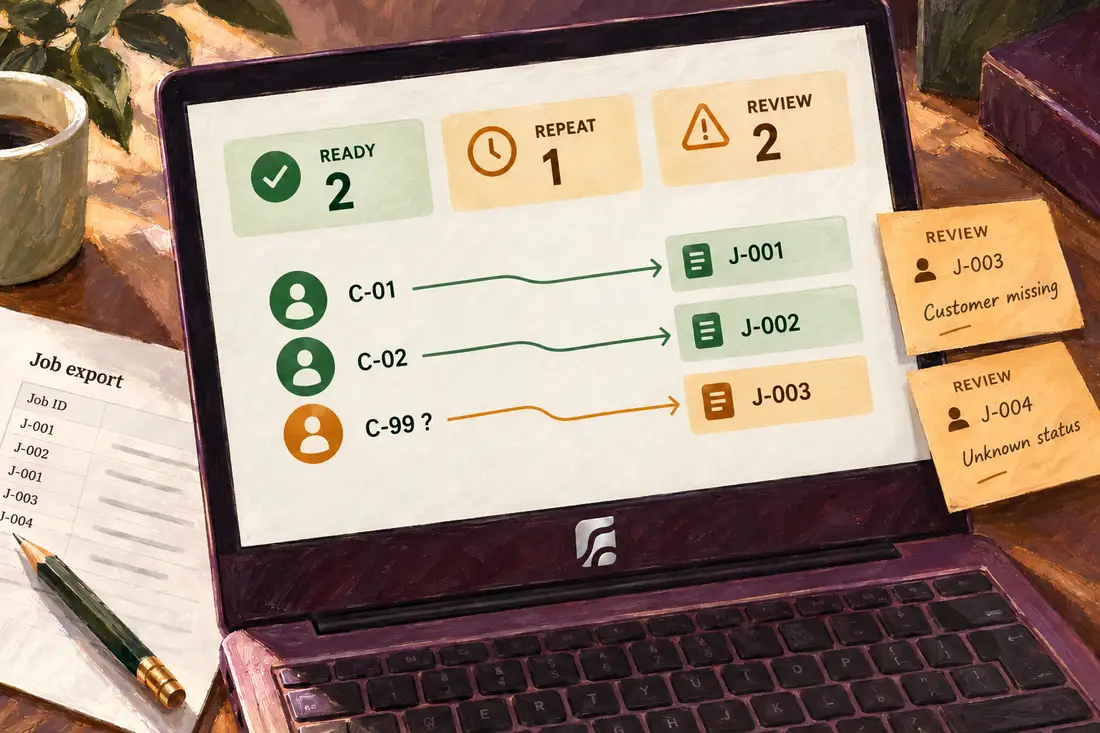
Two rows describe valid jobs, one repeats the first job exactly, one references a customer absent from our customer map, and one carries an unmapped state. The first pass creates two records, recognizes one unchanged repeat and holds two rows for review. Every input row appears in the outcome record.
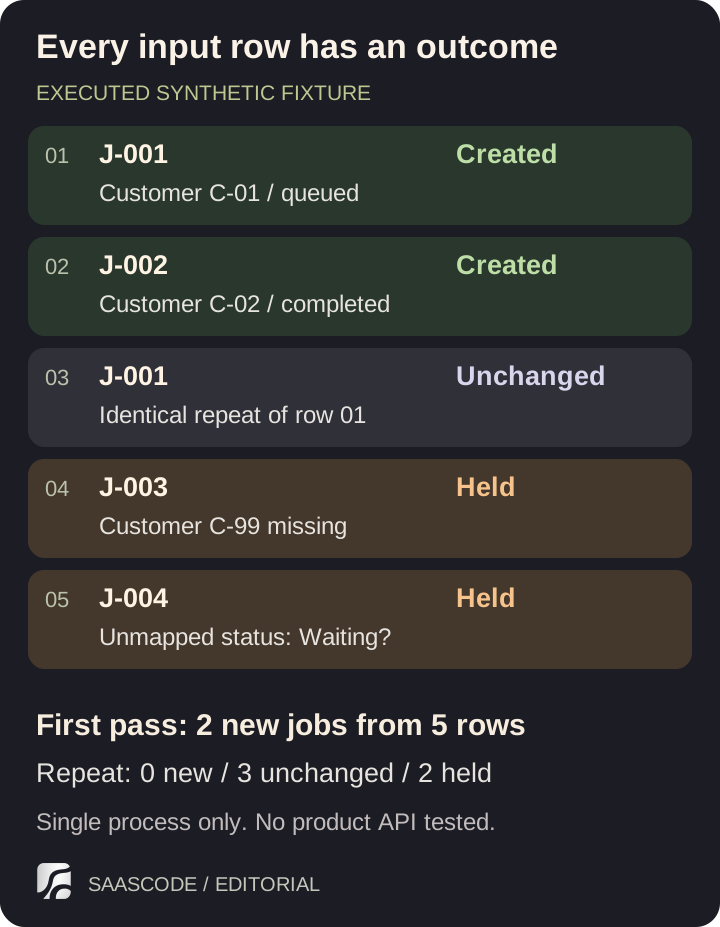
Original diagram of the executed local fixture. Five input rows become two unique jobs; held rows remain unresolved. This is not a screenshot or performance claim for a SaaSCode product.
Running the same input against the same in-memory destination creates zero additional records: the three rows representing the two existing jobs are recognized as unchanged, and the two unresolved rows remain held. That result demonstrates the fixture's chosen repeat behavior within one process. It does not establish safety across restarts, simultaneous workers or uncertain network outcomes.
We also changed the title of an existing source job in a separate check. The fixture held it as a conflict instead of overwriting the destination. That is our deliberate example policy. A real importer might support updates, but then it needs a rule for competing changes: what if the customer edited the destination after the first import?
The reconciliation is five input rows = two created + one unchanged repeat + two held, not “five customers migrated.” Jobs and customers are different entities. Likewise, a held row is not a successful migration merely because the application kept an error message for it.
Check the file and the relationships, not just the upload
A sample should include awkward values that occur in the customer's work: accented names, commas in descriptions, quoted phrases, empty values, long notes and unfamiliar states. Export a fresh sample using the source's documented procedure, then inspect what the destination actually reads.
RFC 4180 documents common CSV conventions, including quoted fields for embedded commas, quotes and line breaks. It is an informational RFC, not proof that every importer accepts the same dialect. Check the destination's encoding, delimiter and date requirements rather than renaming an arbitrary file to .csv.
Do not let spreadsheet convenience silently change identity. Leading zeros in a reference may matter. A date like 10/11/2026 needs a known interpretation. The localization walkthrough explains why language, date format and appointment zone need separate decisions.
After a trial import, open representative records as the intended customer role. A coordinator should see the right jobs and files; another customer workspace should not gain access to them. Counts cannot reveal a correct job attached to the wrong customer. Test an ordinary relationship, a missing relationship and one that should be inaccessible.
Include files explicitly. A spreadsheet cell containing an attachment URL may be a temporary link, a reference to a private system or merely metadata. Determine whether the file must be copied, which account can retrieve it and who should be able to open the destination copy. Do not treat a transferred filename as transferred file content.
Agree on the moment everyday work changes systems
A clean rehearsal can still miss records created between the export and the switch. For our small business, a proposed cutover is a short, agreed pause in source edits: export the final changes, reconcile them, get customer acceptance, then open the new system for normal work. The pause is a business decision with an owner, not an assumption hidden in a script.
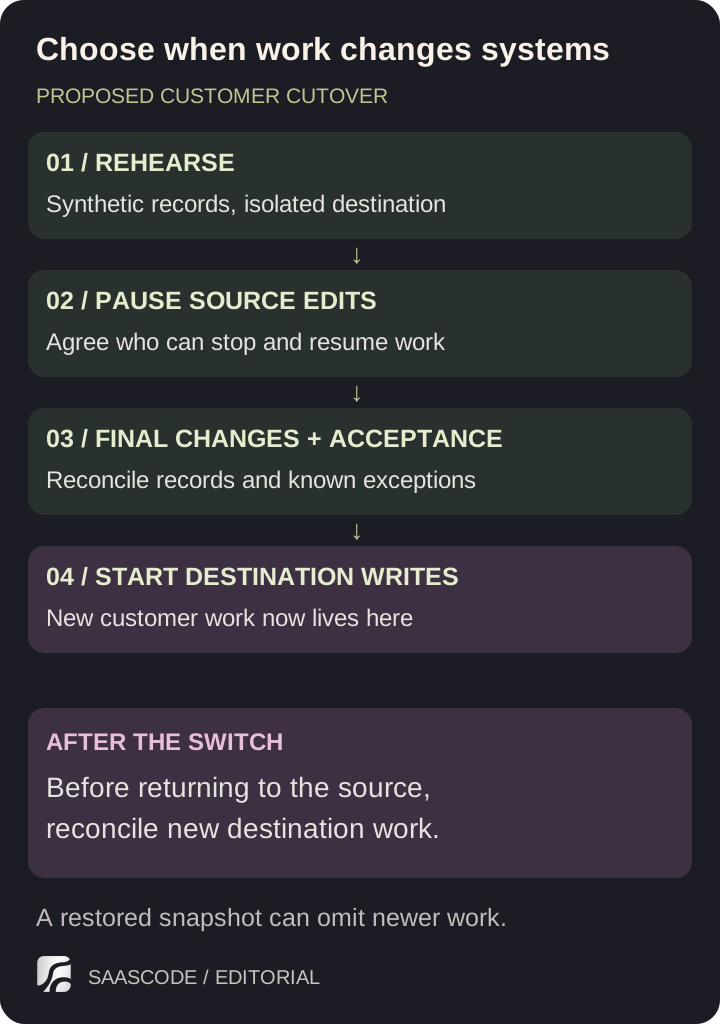
Proposed operating sequence for the fictional business. Before destination writes start, a failed acceptance can return work to the source. Afterward, new destination work must be reconciled before switching back.
If the business cannot pause, define how ongoing changes are captured and what happens when both systems edit the same record. That is a more demanding design than rerunning a file. The integration guide covers repeated delivery and ambiguous outcomes for a continuing connection; a one-time import should not quietly grow into an unsupported two-way sync.
Name the person who decides whether to proceed. Give them an exception summary, the final source-export time, the in-scope destination totals and the customer checks. If unresolved rows are excluded from the pilot, the customer must understand which work remains in the old system and how it will be handled.
Preserve the source and an appropriate pre-import recovery point under the agreed access and retention arrangements. Before destination writes begin, reopening the source may be enough to resume work after a failed acceptance. Once people create new jobs in the target, switching back requires reconciling those new records. Restoring an earlier database blindly could discard work done since the import.
Let the customer accept a working result
Ask the coordinator to do a normal piece of work: find a customer, open a job, locate its notes, assign the next action and return to it. Ask about an exception too. Can they see why a held job is absent and who will resolve it? A successful technical import does not remove the need for that explanation.
Keep the sign-off short and specific: scope accepted, known exceptions, source cutoff, where new work belongs and the contact for problems. In the first working session after cutover, watch for missing context rather than simply sending a completion email. Separate migration defects from requests to redesign the workflow.
For a paid pilot, scope the assistance as carefully as the software. Agree who cleans the source, approves mappings, resolves exceptions and reviews the result. If each customer needs substantial manual cleanup, account for that work in the offer. The first-customer guide helps keep a pilot bounded enough to learn from.
SaaSCode's catalogue of finished applications can give you a product to operate and adapt. Check the selected application's actual import and extension capabilities before promising a migration. The valuable starting point is working software; the valuable handover is a customer who can keep working with their own records.
Editorial collaborations
Something useful to add?
Bring a documented case, an expert perspective or a better source to the SaaSCode blog.
Editorial collaborations