On this page
Updating a customized SaaS database starts with a compatibility question: can the application versions that are still running read and write the schema you are about to introduce? Preserve the customer's existing records, account for new work arriving during the change, and decide how you would recover before removing anything.
A purchased SaaS can be a finished product you operate and a base you adapt. Once you have added customer-specific fields or workflows, an upstream update has to fit that deployed reality. A clean code merge does not establish that the database change is safe.
This guide works through one small example: changing a note column's name while keeping its meaning and contents. We executed the example locally with fictional records. It demonstrates a migration sequence and its failure cases; it is not a production migration script or a promise of zero downtime.
Define the change before accepting the migration
Imagine you operate a job-management SaaS. Its jobs table includes an ID, an organization ID and a customer_note field. An incoming application update expects the same information under handoff_note.
For this example, both names mean exactly the same thing: an internal instruction for the person doing the job. We are not changing who can see it, making it public, summarizing it with AI or combining it with another field. If your change also changes meaning or visibility, you need a separate mapping and permission review.
Write down the application versions involved. Here there are three:
- Old application: reads and writes
customer_note. - Compatibility release: reads
handoff_notebut still writescustomer_notethrough the temporary bridge described below. - Final release: reads and writes only
handoff_note, after the old field and bridge are removed.
This intermediate release is work you deliberately implement and test. Do not assume an upstream release already behaves that way. Your scheduled jobs, importers and integrations count as writers too, even when the web application has finished deploying.
For the broader decision about which upstream changes to adopt, see maintaining a private SaaS fork. Here we will focus on the data transition itself.
Why a direct rename can break a working application
Our starting dataset contains three jobs across two fictional organizations. One note contains text, one is an empty string and one is NULL. Keeping those last two distinct matters: an intentionally blank value and an absent value need not mean the same thing to your application.
The obvious rename changes the schema in one statement:
ALTER TABLE jobs
RENAME COLUMN customer_note TO handoff_note;
In our rehearsal, an old query asking for customer_note immediately failed with PostgreSQL error 42703: the column no longer existed under that name. The rows were still there. The application contract was broken.
We ran that attempted change and the old query inside one test transaction. When the query failed, the test transaction rolled back and the original schema and all three records were intact. That observation does not mean a deployed application can automatically reverse a previously committed migration.
The experiment ran in PGlite, an embedded PostgreSQL environment, with sequential SQL and synthetic data. Its single-connection setup did not reproduce production traffic, competing transactions, deployment timing or database access policies.
Expand the schema and keep one write authority
The next attempt adds handoff_note while retaining customer_note. During this phase, the old field remains the write authority. A temporary trigger mirrors it into the new field whenever a job is inserted or updated.
The following is the essential shape of the isolated example. Adapt naming, permissions, existing triggers and deployment behavior before considering anything similar for a real database.
ALTER TABLE jobs ADD COLUMN handoff_note text;

CREATE FUNCTION mirror_customer_note()
RETURNS trigger LANGUAGE plpgsql AS $$
BEGIN
  NEW.handoff_note := NEW.customer_note;
  RETURN NEW;
END;
$$;

CREATE TRIGGER mirror_customer_note
BEFORE INSERT OR UPDATE ON jobs
FOR EACH ROW EXECUTE FUNCTION mirror_customer_note();

UPDATE jobs SET handoff_note = customer_note;
We install the write bridge before the backfill. Otherwise, a one-time copy can look complete while a later insert leaves the new column empty. In the rehearsal, a fourth job arrived through the old write shape after the backfill. Its note appeared in both fields.
The compatibility release also writes the old field. Updating a note from “Use the side entrance” to “Use the loading bay” made the new reader see the edit through the trigger.
This bridge is intentionally one-way. A caller that writes only handoff_note during this phase is incompatible: the trigger replaces that value with customer_note. We tested that failure case too. Do not deploy the final, new-field-only writer while this bridge is active, and do not describe the two columns as independently writable.
That constraint is why “add a column and dual-write” is an incomplete release plan. You need to specify who writes what, which representation wins and when that rule changes. A two-way transformation would need its own conflict policy and tests.
Verify customer work, not just the row count
After the additive change, compare specific records and relationships. Four rows before and four rows after would not reveal a note copied into the wrong organization or a blank value silently replaced with a default.
Our executed checks confirmed the original record IDs and organization IDs, preserved the initial text, empty string and NULL, and verified the later insert and edit. A null-aware comparison found zero differences between the two note fields:
SELECT count(*) AS mismatched_notes
FROM jobs
WHERE handoff_note IS DISTINCT FROM customer_note;
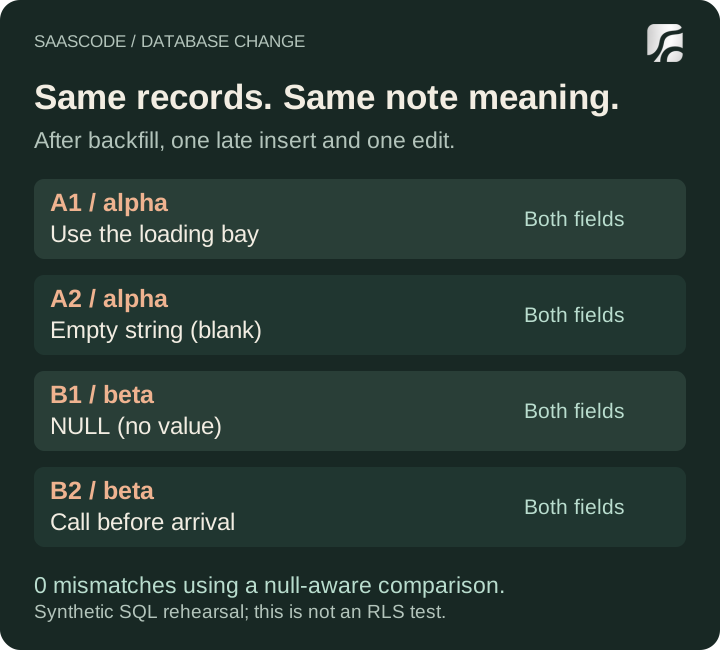
Original diagram of the executed synthetic example after the late insert and intentional edit. The two note fields match; blank and NULL remain distinct.
Use the same principle for your own customization. If an upstream change touches billing, inspect the relevant subscription identifiers and lifecycle behavior. If it touches a customer-owned document, check ownership and attached-file references. Choose evidence for the actual change rather than copying a generic migration checklist.
Our organization-ID check only establishes that these labels were retained. It does not test tenant isolation. In a real rehearsal, exercise the application with its actual user roles and row-level security policies; administrative SQL access can hide permission failures that customers would encounter.
Also test the screens, exports, background jobs and integrations that consume the changed field. This example tests database behavior, not your application's complete customer journey.
Remove the old field only at a deliberate cutover
The expanded schema gives you a period in which the old application and the compatibility release can coexist. It does not make every application version compatible forever.
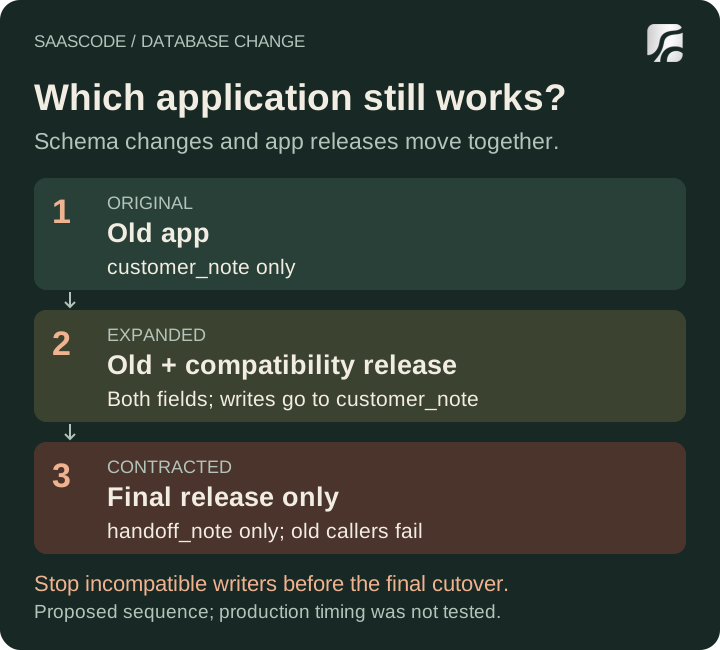
A proposed release sequence for this example. The final cutover requires a coordinated writer change; the diagram makes no zero-downtime claim.
Before contraction, identify every remaining reader or writer of customer_note. Include old application instances, workers that have not restarted, queued jobs, scripts and external integrations. “The new homepage loaded” is not evidence that all of them have moved.
For our small rehearsal, we simulated a maintenance boundary: stop old and compatibility callers, remove the trigger and old column, then use the final reader and writer. A new-field-only write succeeded after that cutover. An old reader failed again, exactly as expected.
For a real system, decide whether a maintenance window is acceptable or whether you need a more sophisticated transition. Rehearse that approach on the relevant database version and a representative dataset. Do not infer timing from five local rows.
PostgreSQL's ALTER TABLE documentation describes lock requirements that vary by operation; many forms require an ACCESS EXCLUSIVE lock. It also documents the checks involved in adding constraints. An additive change still deserves a review of lock waits, table size and the work it will perform.
A useful release record names the schema state each application build expects. After contraction, an older application artifact may no longer be a valid rollback target, even if it deployed successfully yesterday.
Separate application rollback from data recovery
There are three different operations you might need:
| Operation | What you are trying to recover | Question to answer first |
|---|---|---|
| Redeploy a previous application | Working application behavior | Can that version still use the current schema? |
| Apply a corrective migration | A valid schema and data shape going forward | Can you repair the change without discarding later work? |
| Restore an earlier database state | Data and schema from a known point | What happened after that point, and how will it be reconciled? |
We made the last distinction visible in the local test. At the snapshot boundary, the database contained four jobs. We then added a fifth, A3, with the note “Added after snapshot.” Loading the earlier snapshot into a separate local database returned four jobs. A3 was absent.
That is an observed boundary, not a failed backup: a snapshot cannot contain a record that did not yet exist. If you replace the live database with that earlier state, you need a plan for legitimate work accepted afterward. The same question applies to edits, payments recorded elsewhere and messages already sent.
Our test used PGlite's local data-directory export and import. It was not a hosted-provider restore, a point-in-time recovery test or a portable production backup procedure.
Check the provider's actual recovery scope as well. Supabase's backup documentation says database backups do not include the object bytes stored through its Storage API, and that a project is inaccessible during a restore. Restoring database metadata alone therefore does not demonstrate that every uploaded customer file has been recovered.
Record the recovery point, the expected interruption and the person responsible for reconciling later work. If the plan depends on stopping writes, include all write paths. If it depends on replaying events, verify which events are available and how duplicate effects will be prevented.
Make the next release small enough to understand
For a customized SaaS, the practical goal is a reviewed change with a known compatibility window. Keep the migration, application changes and rehearsal results together. Document what is preserved, what is intentionally transformed and what ends compatibility with the previous release.
Our local example passed twelve checks, including the expected failures. It established behavior for a same-meaning note rename, late inserts, an edit, blank and missing values, a controlled cutover and an earlier snapshot. It did not establish production performance, authorization safety or recovery readiness.
Avoid rebuilding a live database as a shortcut for applying an update. If your workflow includes reset commands, review the distinction between a disposable local reset and a remote database operation before changing the release procedure.
When evaluating a SaaSCode product, inspect its source, documentation and deployment requirements alongside the business workflow you want to operate. A finished product can give a developer a substantial starting point for adaptation. Maintaining that adaptation includes knowing how the next database change will treat the customer work already inside it.
Editorial collaborations
Something useful to add?
Bring a documented case, an expert perspective or a better source to the SaaSCode blog.
Editorial collaborations