
On this page
Give customers control over an AI feature at the point where it touches their work. Let them see what the suggestion is based on, change it, use it deliberately, or continue without it. A model selector and a creativity slider rarely answer the question that matters to a busy customer: what will happen to my work if I click this?
Consider a project-management SaaS that helps an agency draft a client update from selected project notes. The useful outcome is an accurate update the agency is comfortable sending. Generating fluent text is only one step. The customer still needs to resolve uncertainty, preserve their edits and decide when a draft becomes a message.
This article develops a proposed interaction for that fictional feature. The sample notes and suggestions are authored examples, not outputs from a tested AI model. A small local exercise checks some draft-state rules; it does not validate a production application. If you have not yet chosen the job for AI, start with adding one useful AI feature to an existing SaaS.
Put control around the customer job
An agency owner should be able to ask for a shorter update, exclude an internal note or correct a date. They should not need to understand sampling settings to do those things. Keep the ordinary editing workflow recognizable, then add assistance where it removes work.
For our example, a compact entry point could say: “Draft a client update from these three notes. Review before sending.” The customer selects the notes and requests a suggestion. The existing editor remains available throughout. This is a proposed product choice, not a requirement that every AI interaction needs a confirmation screen.
Microsoft's HAX Design Library includes guidance on easy invocation, dismissal and correction, along with global controls and explaining the consequences of actions. Those principles help frame the decision. The specific controls below are our application of them to a draft-writing job, not a Microsoft interface or endorsement.
The distinction is practical. “Use suggestion” should describe a change to the editor. “Send update” should describe a message leaving the application. Combining both behind a button called “Improve” leaves the customer guessing about the effect.
Make one mistake easy to find and fix
Imagine the selected notes say:
- Homepage approved by the client.
- Payment integration is still under review.
- Launch date pending.
An authored suggestion reads: “The homepage is approved and we are ready to launch on Friday.” It has introduced a date and hidden unfinished work. A generic “AI can make mistakes” notice does little to help the agency owner locate those problems.
A more useful review shows the selected notes beside the proposed update. The owner changes it to: “The homepage is approved. Payment integration remains under review; we will confirm the launch date after that review.” They can apply that edited version to the draft without sending anything.
The interface should make the source easy to inspect, but a source link does not prove that every generated sentence follows from it. In this example the person finds the mismatch by reading the notes. We are not claiming an automatic detector identified the unsupported Friday promise.
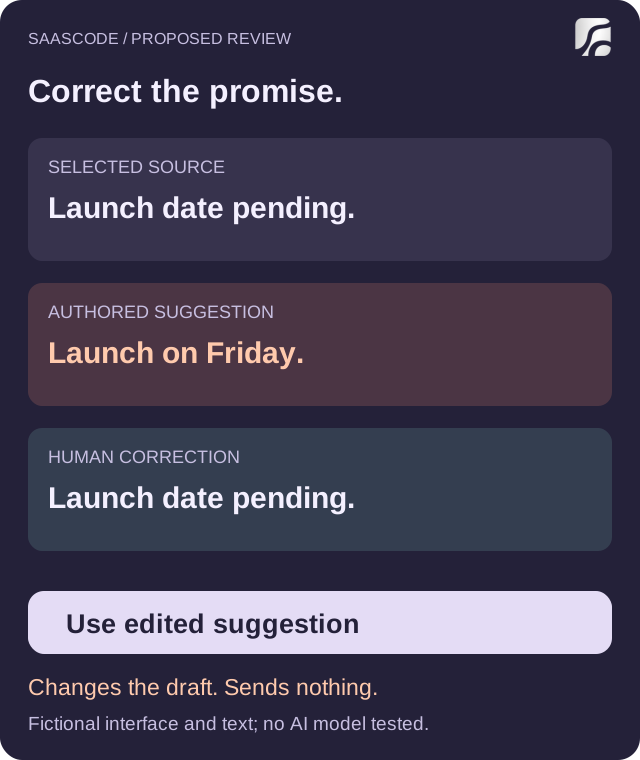
Original interface sketch with fictional text. It illustrates a human correction, not a shipped feature, model output or automated factual check.
Avoid making “try again” the only response to a bad suggestion. Regeneration can be useful for another phrasing, but it may also replace parts that were already right. A person who knows the correct wording should be able to edit it directly. A person who does not know the date should be able to leave it unresolved.
If you allow partial acceptance, define its scope. “Replace this paragraph” is easier to understand than “Apply improvements” when the customer has edited three other paragraphs. Start with a whole-draft comparison if that is what you can implement reliably; do not suggest selective merging when the application actually overwrites everything.
Separate review, saving and sending
For this proposed workflow, the controls have different consequences:
| Customer action | What it changes | What it does not do |
|---|---|---|
| Draft with AI | Creates a separate suggestion from the selected notes | Replace existing writing or send a message |
| Edit suggestion | Changes the proposed text | Change the underlying project facts |
| Use edited suggestion | Replaces the editor text after the current-version check | Send the client an update |
| Dismiss | Removes this suggestion from the review area | Delete the customer's draft |
| Save draft | Persists the current editor content, if the application supports that operation | Deliver it to the client |
| Send update | Delivers the reviewed message to the displayed recipients | Guarantee that the client's inbox can later be recalled |
This table describes an intended contract. In a real product, labels and behavior must match its existing save and delivery mechanisms. If the editor autosaves, say so; do not add a misleading Save button just to imitate this example.
Before sending, show the recipient and the actual final message. For an internal note, the audience may be a project team instead. The boundary should follow the consequence of the action, not the mere presence of AI. A low-impact wording suggestion need not interrupt the reader with a dramatic warning, while an external message needs a clear delivery action.
Access rules still belong to the application. A person who cannot view a project note should not gain access to it through a generated update. Likewise, being able to generate a draft should not grant permission to send on behalf of someone else. These are implementation requirements to verify, not capabilities demonstrated by our writing example.
Protect the edits made while AI was working
There is a less visible failure than a wrong date: a delayed suggestion can erase a correct manual edit. The customer asks for a draft, keeps working, and receives a result based on an older version. Applying it automatically treats their newer work as disposable.
We executed a small in-memory exercise for this article using invented strings and revision numbers. A suggestion records the editor revision it started from. Applying it succeeds only when that revision is still current and the suggestion remains open. An accepted suggestion is consumed, so pressing Apply again does not replay it.
In the stale-result case, generation starts at revision 1. The customer types “Ask the client to confirm the date,” advancing the editor to revision 2. The revision-1 suggestion arrives. The exercise rejects its application and keeps the customer's revision-2 text.
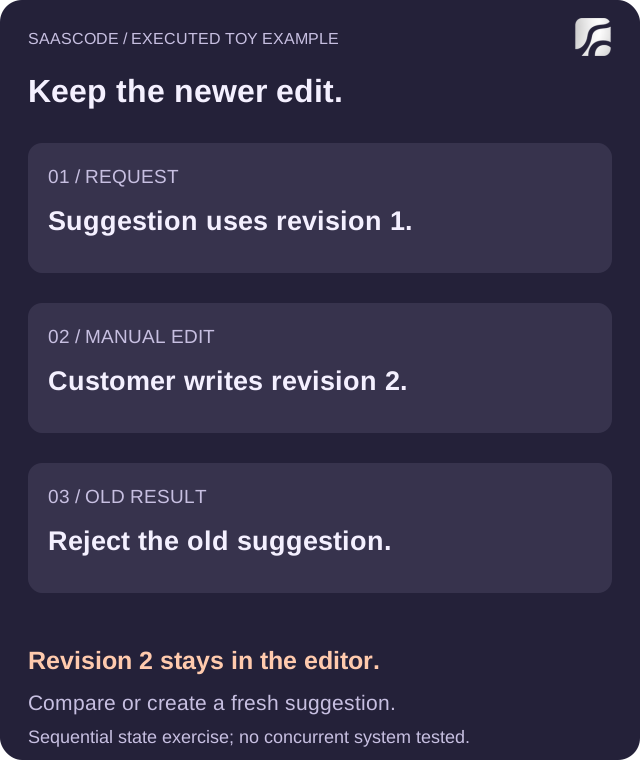
Original diagram of the executed local state exercise. Requests and edits are sequential simulated events; no real AI request, database transaction or concurrent session was tested.
The customer-facing response can be simple: “Your draft changed while this suggestion was being prepared. Compare it with your current draft, or create a new suggestion.” Preserve both versions long enough for that choice. Do not silently discard the person's work to make the interaction feel faster.
The same exercise covers dismissal, a repeated Apply action, a fresh edited suggestion, immediate restoration and restoration after a later edit. Dismissal leaves the draft intact. A fresh edited suggestion can be applied once. Immediate restoration returns the previous editor text; once a further manual edit exists, automatic restoration is refused so it cannot erase that newer text.
These results demonstrate only the toy state rules. A production implementation needs appropriate server-side version checks, persistence, permissions and concurrency handling. A revision number checked only in the browser is not proof that another session cannot overwrite the same record.
Make recovery as precise as the original action
“Undo” is useful when the product can actually return the affected work to its earlier state. In the proposed draft editor, “Restore previous text” means exactly that. It does not mean deleting a message from a client's inbox or undoing edits to the source notes.
After a subsequent edit, offer a comparison or a copy of the earlier text instead of blindly restoring over the current version. The right recovery depends on what changed. A paragraph replacement, a saved record and an external message have different consequences.
The exercise's immediate restoration is deliberately narrow. It restores only the text replaced by the latest application, and only while that applied revision is still current. It does not promise recovery across a browser restart, another editor or a sent message. Those cases need their own design and evidence.
This makes support clearer too. “The suggestion was wrong,” “my correction disappeared,” and “the client received the wrong message” are three different incidents. Preserve enough permitted operational context to tell them apart, without copying all customer notes into a new logging system by default.
Let customers decline assistance without losing the workflow
One-off dismissal and a lasting preference solve different problems. A customer may dislike this suggestion but want help next time. Another may prefer to write all project updates manually. Give each choice a meaning the customer can predict.
For this example, a personal preference called “Offer AI drafting in my editor” could hide the entry point for that person. It would not, by itself, change the workspace's data-processing policy or stop another authorized teammate from using AI. If you provide a workspace-wide control, explain who can change it and which requests it prevents.
A request already in flight also needs an explicit rule. Disabling future requests does not necessarily cancel one already sent to a provider. Avoid telling the customer that data was never processed when the control only prevents the result from being applied. Describe the actual behavior your implementation supports.
When generation fails, retain the editor and the selected source notes. Offer a retry when appropriate and a direct path to finish manually. A failed convenience feature should not turn an otherwise usable writing workflow into a dead end.
Feedback has a separate purpose. “This introduced an unsupported date” can help your team investigate a defect. Editing the text fixes this draft. Neither action should be described as training the model unless a real, disclosed process does that. Tell customers what feedback is used for and keep any required data choices separate from accepting a suggestion.
Evaluate whether the controls save real work
Test the complete task with people who understand the job: inspect the notes, find the unsupported promise, correct the update and reach the intended recipient decision. An acceptance rate alone cannot tell you whether they reviewed the text or simply clicked the most visible button.
Look at where they hesitate, whether they can explain what Apply does, whether they notice stale results, and whether they can finish when AI is unavailable. Compare the total effort with the existing manual workflow. No reduction in time or mistakes is established by the illustrative interface in this article.
If users need repeated regeneration to make a simple factual correction, improve the editing interaction before assuming a different model will solve it. When the evidence does point to model behavior, the AI model upgrade guide covers evaluating that change separately.
SaaSCode's catalog of finished products with source code offers a starting point you can operate and adapt. Evaluate the delivered workflow first, then decide whether an AI drafting extension and these controls fit your customers. SaaSCode's AI-first production approach does not mean every catalog product includes this feature.
For the agency example, a good next step is a bounded review prototype: show the selected notes, keep suggestions separate, protect newer edits and make delivery explicit. The value is a customer who can use assistance without surrendering ownership of the work.
Editorial collaborations
Something useful to add?
Bring a documented case, an expert perspective or a better source to the SaaSCode blog.
Editorial collaborations