
On this page
Custom domains for SaaS customers let each customer use an address they control for a supported part of your application. A studio might want its clients to visit portal.studio.example instead of your default service address. The feature is ready when that address reaches the correct workspace, the required journey works over HTTPS, and someone owns the process when the configuration changes.
The commercial reason is straightforward: your customer wants its brand to remain visible in a recurring customer interaction. The operating decision is larger than adding a domain field. You are accepting responsibility for activation, support and removal across systems that you and the customer control separately.
Start with one defined surface and a complete lifecycle. The fictional Studio example below shows what that can look like. Its domain names and results are illustrative; they are not a live hosting configuration.
Decide which customer experience gets the address
“Custom domain” can describe a public storefront, a client portal, a booking page or an entire application. Those are different promises. A domain on a public page does not establish that sign-in, invitations and password recovery will work on it too.
Write the offer as a customer journey: “Studio clients open their portal, sign in and view their own project under Studio's address.” Then identify every transition in that journey. Does an invitation open the default hostname? Where does a signed-out visitor go? Does checkout intentionally move to another service? Which address appears in an email generated by the application?
Those transitions need an explicit answer. A payment page on another service may be appropriate; it should not become a surprise discovered after you promised that every interaction would use the customer's domain.
Also distinguish the address you use to operate your SaaS from addresses your customers attach to it. Our source-code launch guide covers the first deployment. A customer-domain feature adds a repeated relationship: one hostname, one authorized customer account, one supported experience, with a lifecycle for each attachment.
For an initial offer, a named subdomain such as the fictional portal address is a clear scope to evaluate. An apex domain, wildcard or several aliases deserves its own provider-specific setup and tests. Do not turn instructions for one of those into instructions for all of them.
Keep the readiness checks separate
A customer entering a hostname tells you what they want. It does not prove they control it, authorize them to attach it to a particular workspace, or establish that your application will handle requests correctly.
Cloudflare's hostname validation documentation provides a concrete infrastructure example. It distinguishes hostname ownership validation from certificate validation, with separate tokens and status fields. Its production requirements include an active hostname, active SSL status and DNS directed to the SaaS target. These are provider requirements, not proof that your application's tenant mapping and sign-in journey are correct.
For your own product, give support separate observations rather than one unexplained green dot:
| Observation | Question it answers | What it does not establish |
|---|---|---|
| Authorized request | Can this person manage domains for this workspace? | Control of the external domain |
| Current control proof | Did the requester complete the required verification? | Correct traffic destination |
| DNS destination | Does the hostname resolve through the intended setup? | A usable certificate or correct tenant |
| HTTPS readiness | Can the expected secure connection be established? | Correct application behavior |
| Workspace mapping | Does the application resolve this hostname to Studio? | Permission to read a particular record |
| Journey check | Does the defined client journey work here? | That every other feature supports this hostname |
The hostname chooses a destination; it must not replace the user's normal permission checks. A visitor reaching Studio's portal still needs the appropriate access to Studio's records. Unknown or disconnected hostnames should not select an arbitrary customer as a fallback.
This separation also makes a buying conversation more useful. Instead of asking only whether custom domains exist, ask to see how the product represents pending verification, incomplete activation and removal.
A worked activation: Studio's portal
We ran a small, in-memory decision exercise for this article. It accepts simulated readiness observations and decides whether the proposed application policy would activate Studio's hostname. It does not query DNS, issue certificates, make network requests or test a production router.
The sequence begins with an authorized request for Studio. The hostname is reserved to that request while activation is pending. In the first snapshot, control proof and the intended DNS destination are present, but HTTPS is not ready. The decision is hold. In the second, HTTPS is ready but the defined journey check is still incomplete. The decision remains hold. Only the third snapshot, with all required observations present, activates the mapping to Studio.
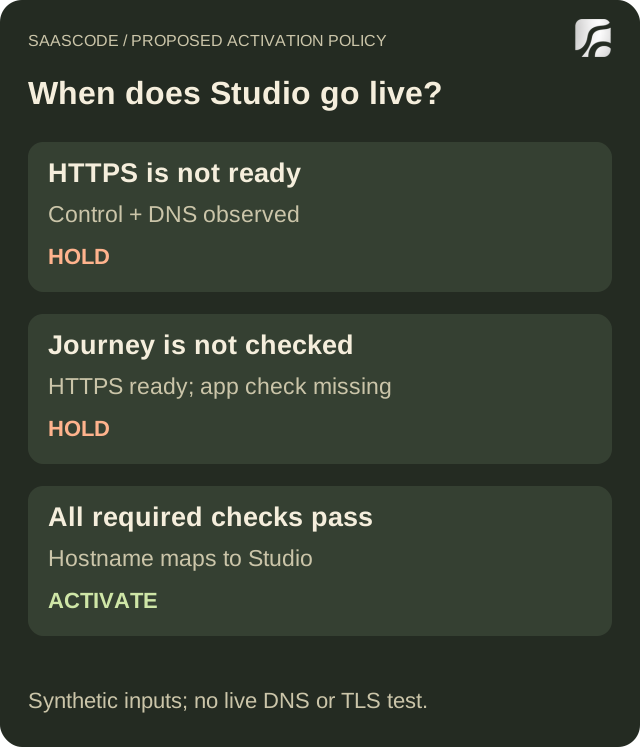
Original diagram from the executed local decision exercise. Inputs are simulated observations, not measured DNS or certificate results.
A fourth request asks to attach the same hostname to Harbor, another fictional customer. The exercise rejects that conflicting claim and preserves Studio's mapping. This is an application rule in the example, not a statement about the uniqueness rules of every infrastructure provider.
The practical lesson is to make activation a deliberate transition. A support agent should be able to see what remains incomplete and which workspace will receive traffic when it becomes active. An invitation to change DNS is not the same event as an application declaring the domain ready.
In a real implementation, these decisions also need durable state, concurrency handling, trustworthy observations and failure recovery. The exercise demonstrates the intended outcomes; it does not implement those production controls. Use it to agree on behavior before evaluating whether the selected application and hosting integration deliver it.
Make “I changed the DNS” a diagnosable support request
Suppose Studio reports that its portal is still unavailable after changing a record. “Wait longer” is a poor default when you do not yet know what is wrong. Begin with the exact hostname and the last observation for each readiness check.
If your observed destination differs from the required target, show the expected record and the observed value with the check time. Ask the person who controls the customer's DNS to confirm the configuration. Avoid requesting account passwords or unrelated zone exports. If the destination is correct but the certificate is not ready, record that as a separate issue; repeatedly changing a correct DNS record is not a diagnosis.
If HTTPS works and the page reaches Studio, but an invitation lands somewhere unexpected, investigate the application's link and authentication behavior. That is a different support path from ownership verification. Test the actual invitation flow, including the signed-out state, rather than declaring success from the portal homepage alone.
A compact support record can contain the hostname, intended workspace, current state, last checked time, observed failure and next responsible person. Keep verification material in the appropriate restricted system; do not paste it into a public support thread merely to make a ticket look complete.
Decide in advance whether customers can use a default service address during an incident. Offer that route only if the same journey and access boundaries have been tested there. A fallback that opens the wrong workspace or breaks the customer's login is not a recovery path.
Treat removal as part of the feature
Customers leave, change brands and transfer control of domains. A feature that can attach an address but cannot explain how to detach it is unfinished as an operating offer.
In our proposed lifecycle, removing Studio's hostname disables its application mapping. A later request through that hostname resolves to no customer in the fixture, even if the simulated old DNS observation remains true. A new attachment starts with a new verification attempt; old proof is not carried into the new request.
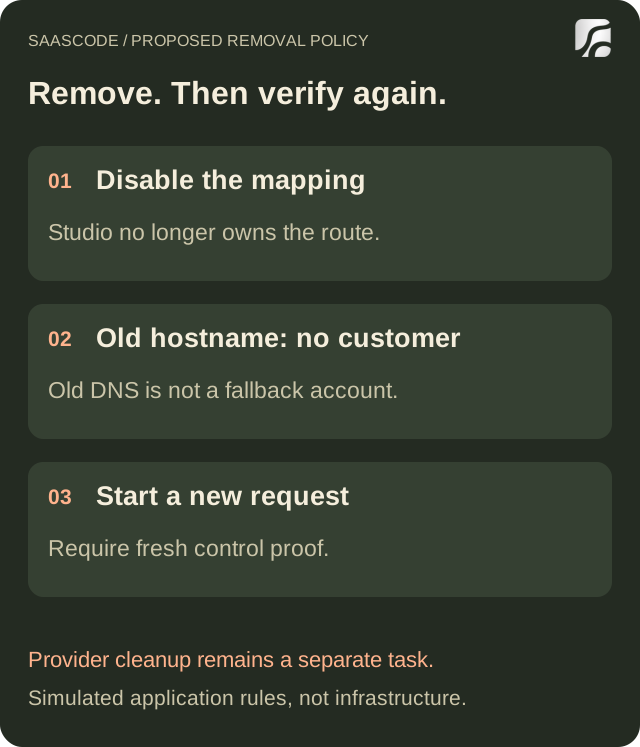
Original diagram of the simulated application policy. Provider cleanup and the customer's DNS changes are separate work that this exercise does not execute.
Real removal must cover your hosting provider too. Cloudflare's custom-hostname removal guidance tells SaaS providers to remove a churned customer's custom hostname. Follow the current procedure for your provider and configuration; disabling an application row alone does not demonstrate that infrastructure cleanup happened.
Give the customer specific instructions for records they control, and give your operator a separate cleanup task. Record both outcomes. If the customer has not changed DNS yet, that should remain visible as an outstanding observation rather than being silently treated as completed work.
For a legitimate migration between accounts or providers, plan the handover explicitly. Do not let an ordinary “add domain” submission become an undocumented transfer mechanism. Confirm who is authorized to request the change, what fresh proof is needed and when the old mapping stops serving the previous workspace.
Price and support the complete promise
Whether custom domains belong in the base offer or a paid tier depends on your customers and operating costs. The useful starting point is the support obligation, not a competitor's badge.
Estimate the work around a domain: initial assistance, unsuccessful verification, changed DNS, certificate incidents, application updates affecting the journey, and eventual removal. Keep infrastructure charges separate from your own support effort. No universal cost estimate follows from the presence of a custom-domain API.
Managed certificate services can take on specific infrastructure work. For example, Cloudflare describes issuance and renewal management in its certificate management documentation. You still need to decide how your product detects a broken customer journey and who responds. Our managed-platform versus VPS guide helps frame that broader operating choice.
Avoid promising a completion time that depends entirely on an external DNS administrator. State what your team handles, what the customer must supply and how status will be communicated. That makes the branded address a service you can support rather than an unresolved setup ticket attached to every sale.
Evaluate the product before extending the promise
A finished SaaS product can be a strong base for this offer. The question is whether its actual customer-domain behavior matches the experience you intend to sell. Source access also gives a developer a place to implement a missing integration, but it does not prove that integration already exists.
In a demo or technical review, request evidence for the whole lifecycle: a pending request, successful activation for the correct customer, a conflicting claim, a changed configuration and a removal. Check generated links and sign-in on the chosen hostname, as well as the visible landing page. Ask which surfaces and hosting configurations the product supports today.
Then explore the SaaSCode catalog against that scope. Choose the application for its working customer journey, verify the domain capability you need, and budget any adaptation separately. You can start with a supported default address while preparing a narrower custom-domain offer. The goal is a recognizable customer experience that remains understandable when something changes.
Editorial collaborations
Something useful to add?
Bring a documented case, an expert perspective or a better source to the SaaSCode blog.
Editorial collaborations