On this page
Use an audit trail to investigate a particular action: which account or process acted, on which customer record, when, and with what result. Use product analytics to study a defined pattern of use: how often customers complete a workflow, where they stop, or whether they return. A SaaS may need both, but the records should serve their intended questions.
The distinction is not simply a table versus a chart. Analytics tools can show individual events, and audit records can be summarized. What matters is the event's meaning, where it was recorded, which actions are covered and who can inspect it.
Suppose a customer asks, “Why did this task's due date change?” Your dashboard says the scheduling feature was used twice. That count does not identify the change the customer is asking about. Meanwhile, a detailed history of one task cannot tell you whether most customers find scheduling useful.
Start with the question, then choose the record
Before adding a logging library or another dashboard, write the question the operator needs to answer. The same feature can create several different information needs.
| Question | Useful starting point | Detail that matters |
|---|---|---|
| Who changed this task's due date? | Scoped audit history | Actor, task, workspace, time, outcome and relevant change |
| Did the failed attempt change anything? | Request outcome and committed history | Rejection versus a saved change |
| How many customers use scheduling? | Product analytics with a customer definition | Qualifying event, distinct workspace and observation window |
| Where do people abandon the scheduling flow? | Instrumented product journey | Ordered steps and their completion rules |
| Why did the request take ten seconds? | Operational logs or tracing | Request timing and the services involved |
These records can be connected through carefully chosen identifiers without exposing all their contents to the same audience. A support operator may need a particular customer's history; a product review may need counts across an authorized population. Neither purpose automatically justifies collecting every field.
For a concrete analytics convention, Twilio Segment's Track specification represents an action with a named event and descriptive properties. That structure is useful, but the event name still needs a contract. Task Due Date Updated should mean something different from Save Button Clicked.
Follow one disputed change
We ran an illustrative local workflow for a fictional workspace called North. Its task task-17 begins with a due date of October 12. The example uses synthetic identities and a fictional UTC timeline.
Four requests reach the workflow. Ana's attempt is denied by the fixture's permission rule. A scheduled process then changes the due date to October 13. Lee changes it to October 15. Finally, Lee's exact request is retried with the same operation identifier, and the fixture recognizes it without applying another change.
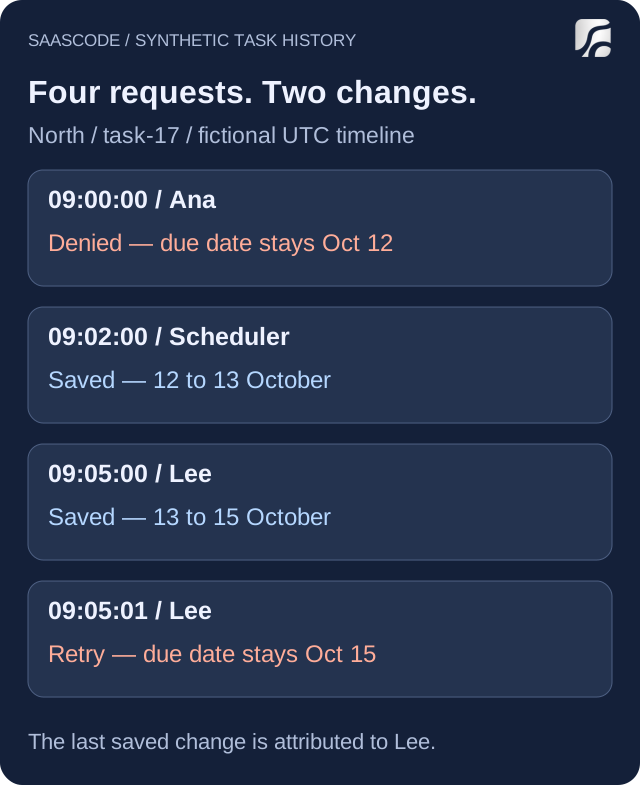
Recorded outcomes from the executed in-memory example. All names, dates and actions are fictional. The fixture's permission flag and repeat handling are illustrative, not a test of a deployed SaaS.
The scoped history answers the narrow support question: in this example, Lee's recorded action made the last committed change, from October 13 to October 15. Ana's denied attempt did not change the date, and the retry did not create another change.
That is an attribution to the recorded account, not proof of a person's intention. If the customer disputes the account activity, investigate the relevant access and request evidence. An event row alone does not establish why someone acted or who physically controlled the account.
The fixture also contains a different workspace, South, with its own task-17. Filtering by task ID alone would mix the two histories. The query uses both workspace and object identity. This illustrates a scoping requirement; it does not prove a real application's authorization is correct.
A machine action needs a machine identity
The scheduled change has a service actor, schedule-rule, rather than an invented human account. That lets support distinguish automation from a manual edit. Where a person starts a job that later runs in the background, the initiating person and the executing process may both matter.
The existing article on audit events without a user session explains that modeling issue in more detail. Here, the operating consequence is simple: a history that attributes every background change to “a user” can send the investigation toward the wrong cause.
Count usage without counting deliveries as work
For the analytics side, our proposed qualifying event is a successfully committed due-date change. It is emitted by the fixture after the state changes. A denied request produces no completion event, and the recognized retry produces no additional completion event.
The analytics record keeps an event ID, workspace key, time, actor type, source and schema version. It deliberately omits the task's text, its due-date values and the individual actor ID. Those details are unnecessary for this example's question about change volume by workspace and actor type.
We then simulated a duplicate delivery of Lee's analytics event. North receives three delivery records: one for the scheduled change and two copies of the event for Lee's change. Grouping those deliveries by their stable event ID leaves two distinct completion events.
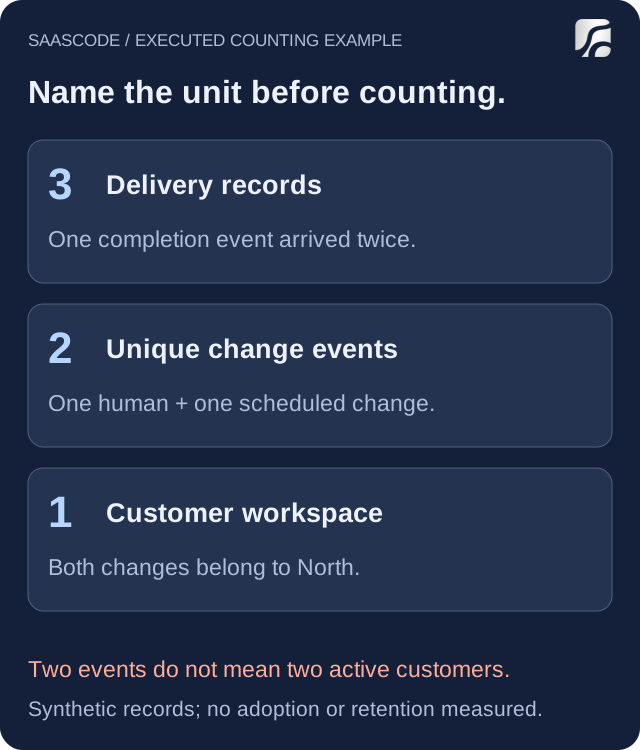
Counts calculated from the synthetic records. Delivery count, completed changes and distinct customer workspaces are different units. The deduplication rule belongs to this fixture; it is not a claim about a vendor's SDK.
The full result is four requests, two committed changes, three analytics deliveries, two unique completion events and one workspace. Within those two unique events, one is human and one is automated. Calling the total “two users adopted scheduling” would be wrong.
Whether automation belongs in a product metric depends on the question. If you are measuring successful work completed by the service, include it under a stated rule. If you are measuring people discovering a manual control, separate it. Do not let a background job quietly become evidence of human engagement.
This tiny dataset establishes neither adoption nor retention. It contains no eligible-customer denominator and no return window. Use the first-month SaaS metrics guide when deciding how to define a customer, a useful result and repeat use.
Give each event a small, explicit contract
For the disputed change, our audit record identifies the workspace, task, actor type, actor ID, action, operation ID, occurrence time and outcome. It retains the old and new due-date values because this particular field is what the support question concerns. The analytics projection uses a smaller selection of fields for a different purpose.
OWASP's logging guidance recommends enough context to establish when, where, who and what, including outcomes and identifiers that connect related events. It also cautions against recording secrets and unnecessary sensitive data. Apply those principles to a defined question rather than copying entire request bodies into a log.
Our example is intentionally selective. A real product might record which fields changed while omitting their contents, especially for confidential notes or documents. Decide the necessary detail for each action. An opaque customer ID can still be linked to a person or organization; removing a name does not automatically make a dataset anonymous.
Keep the meaning of a completion event stable. If a later release changes Task Due Date Updated from “button clicked” to “change committed,” a continuous chart would combine two different measurements. Record the schema or semantic change and account for it when comparing periods.
The same discipline applies to time. Event occurrence and arrival in an analytics system can differ. Choose the clock your report uses. For one record's history, use the application's reliable ordering or version information where available rather than assuming that unrelated device clocks establish an exact sequence.
Decide what missing evidence means
A browser click can record an intention before the server accepts a change. A browser can also fail to deliver telemetry. A record written after a successful change may be lost if the process fails before the record is saved. Choose the recording point and delivery mechanism according to the promise you need to make.
For important state changes, have the implementation preserve the relationship between the mutation and its durable event. That might involve a shared transaction or another appropriate durable design. Merely placing two function calls next to each other does not prove both will survive a crash.
Define how the product behaves when event recording fails and how the operator will notice. A queue that is permanently stuck is not useful history. A dashboard with a gap is not proof that customers stopped using the product. Compare the system's observed coverage with the question before drawing a conclusion.
For repeated deliveries, distinguish an operation ID from a delivery attempt. Our exercise handles an exact repeat in one process; it does not establish safe behavior across simultaneous workers or restarts. The SaaS integration guide explores repeated events and uncertain outcomes in a continuing connection.
An empty audit search deserves the same caution. It may mean no qualifying action occurred, but it may also mean the path was not instrumented, the retention window ended or the reader lacks access. State which coverage you verified. “No matching event found” is often the honest answer until those possibilities are resolved.
Keep access and retention tied to the purpose
Logging adds a second place where customer information can appear. Restrict history queries to the authorized workspace and role. Check exports and direct endpoints as well as the visible interface. A person who can edit a task does not necessarily need access to every administrative event in its workspace.
Choose who can write, read and remove records, and which changes to those permissions should themselves be recorded. If the audit store permits ordinary edits to its own history, describe that limitation; do not call it tamper-proof. Decide retention based on the operating need and applicable obligations rather than treating indefinite storage as a default quality feature.
Analytics needs its own decisions about access, identifiers and retained detail. A product team reviewing completion patterns may not need the underlying customer content. Avoid sending that content to an analytics destination just because the SDK accepts arbitrary properties.
These are design decisions to verify in your application, not a compliance certification. Our local exercise checks selected record and counting rules only. It does not test database durability, real authentication, simultaneous updates, access revocation, log protection or a third-party analytics integration.
Inspect the finished product against two real questions
When evaluating or adapting a SaaS, pick one support question and one product question from the work you intend to operate. For example: “Which account changed this appointment?” and “How many customer businesses confirmed an appointment this week?” Follow the actual records available for each.
An audit screen is useful only if the relevant write paths produce the needed history. An analytics dashboard is useful only if its events and denominators match the workflow. A product may already support the required records, offer an extension point or need a scoped addition; verify the selected application rather than assuming a universal feature.
SaaSCode's finished applications give you software to operate and adapt. Start with the capabilities the chosen product delivers, then extend the specific visibility your business needs. The goal is an operator who can explain a customer's change and a founder who can interpret product use, each with evidence suited to that question.
Editorial collaborations
Something useful to add?
Bring a documented case, an expert perspective or a better source to the SaaSCode blog.
Editorial collaborations